Noah C Huber

Senior Portfolio (Class of 2026)
Bachelor of Arts Applied Computing: Cybersecurity Concentration Degree
View My Resume
SwiftEdge Security & Optimizer
(CSCI Senior Project)
- Class: CSCI 499 Senior Project Defense
- Prepared By: Noah Huber & Daniel Howard
- Program: Applied Computing & Cybersecurity Major
- Project Advisor: Dr. Sean Hayes
- Organization: Charleston Southern University
- Grade: A/TBD
- Date: April 24th, 2026
- Source Code Repository: NoahCHuber/CSCISeniorProject
(Please email me to request access.)
Table of Contents
- 1 Statement of Purpose
- 2 Research & Background
- 3 Project Language(s), Software, and Hardware
- 4 Project Requirements
- 5 Project Implementation Description & Explanation
- 6 Test Plan
- 7 Test Results
- 8 Challenges Overcome
- 9 Future Enhancements
- 10 Defense Presentation Slides
- 11 Additional Considerations
1. Statement of Purpose
SwiftEdge Security & Optimizer was created to provide a single Windows utility that combines performance tuning, lightweight security hardening, system cleanup, and vulnerability scanning inside one graphical application. The project was intended to reduce the need for separate scripts, third-party aplications, built-in utilities, and manual registry or service changes by grouping practical maintenance and security actions into a single PowerShell-based Windows Forms application.
This document exists to support the senior project defense by summarizing the work completed, the current implementation, the testing performed, the challenges faced during development, and future development.
1.1 Problem Statement
Windows systems commonly accumulate performance and security issues over time. Background services and startup entries can reduce responsiveness, temporary files and update caches consume storage, and outdated or vulnerable software versions may remain installed without the user noticing. For many users, addressing these problems requires multiple separate tools, repeated administrative actions, and technical knowledge of registry paths, services, and system settings. SwiftEdge Security & Optimizer addresses this problem by centralizing core maintenance and security tasks into a single utility with a simple tab-based interface. Stable for standalone execution and distribution.
2. Research & Background
The project began with research into common Windows optimization and hardening practices, how similar tools present advanced actions through simple user interfaces and how vulnerability information could be crafted into a lightweight utility, similar to ChristTitus WinUtil. Research included reviewing Windows-native approaches to service control, registry changes, built-in cleanup behavior, Defender configuration, firewall configuration, and software version retrieval from the registry.
Additional background research focused on packaging and portability. Because the project goal was to remain lightweight and avoid large external frameworks, the implementation was centered on PowerShell 5.1, Windows Forms, Windows services, registry, and the National Vulnerability Database feed. Particular effort was spent on understanding how to retrieve vulnerability information without relying on repeated live requests that would be affected by rate limits, and how to package multiple PowerShell modules into a single executable workflow using PS2EXE.
The project was also informed by similar utilities and interfaces referenced during development, including Windows optimization tools and commercial security products that influenced organization, tab layout, and module separation. These references helped shape the project direction, but the implementation itself remained native to PowerShell and Windows features.
3. Project Language(s), Software, and Hardware
3.1 Project Language(s)
The project was implemented entirely in PowerShell 5.1+, using script modules and a Windows Forms front end.
3.2 Software
The primary software and tools used in the completed project include:
- PowerShell 5.1+
- Windows Forms through form assemblies loaded in PowerShell
- PS2EXE for executable compiling/packaging
- NVD JSON feed for vulnerability data
- Visual Studio Code for development
- GitHub for version control and repository hosting
3.3 Hardware
The project targets Windows 11 x64 systems and was designed with modest hardware in mind. The practical baseline described in the project documentation includes:
- Windows 11 x64
- Dual-core CPU minimum (Quad Core or greater Recommended)
- 4 GB RAM minimum (8 GB RAM or greater Recommended)
- Standard desktop or laptop hardware capable of running Windows PowerShell and Windows Forms
4. Project Requirements
SwiftEdge Security & Optimizer was implemented around four core functional modules exposed through the GUI:
- Performance Optimization
- Security Hardening
- System Cleanup
- Vulnerability Scanner
The project requirements were formalized in the SwiftEdge Requirements Document and later refined to more accurately reflect the implemented code. From a glance, the completed work satisfies the following major requirements:
- A Windows Forms GUI with four main tabs
- Independent execution of performance, security, cleanup, and vulnerability actions
- Performance tuning through power plan, service, startup, and visual-effect changes
- Security hardening through SMB, remote feature, Defender, firewall, and memory integrity settings
- Cleanup actions through built-in Windows commands and file-system maintenance
- Vulnerability detection by matching installed software versions against NVD feed data
- Module logging and user-facing completion/error feedback
These requirements support the main project goal presented during defense:
- Improve Windows performance
- Harden system security settings
- Clean unnecessary files and applications
- Detect known software vulnerabilities
- Provide a simple graphical interface
The detailed baseline for these requirements remains in the formal project requirements document:
5. Project Implementation Description & Explanation
SwiftEdge Security & Optimizer is implemented as a modular PowerShell application. The main GUI script loads four module scripts and presents them through a tabbed Windows Forms interface. The application starts with a welcome screen and restore-point prompt before exposing the main tabs. This workflow was chosen to keep the interface simple while still encouraging safe use before system-level changes are made.
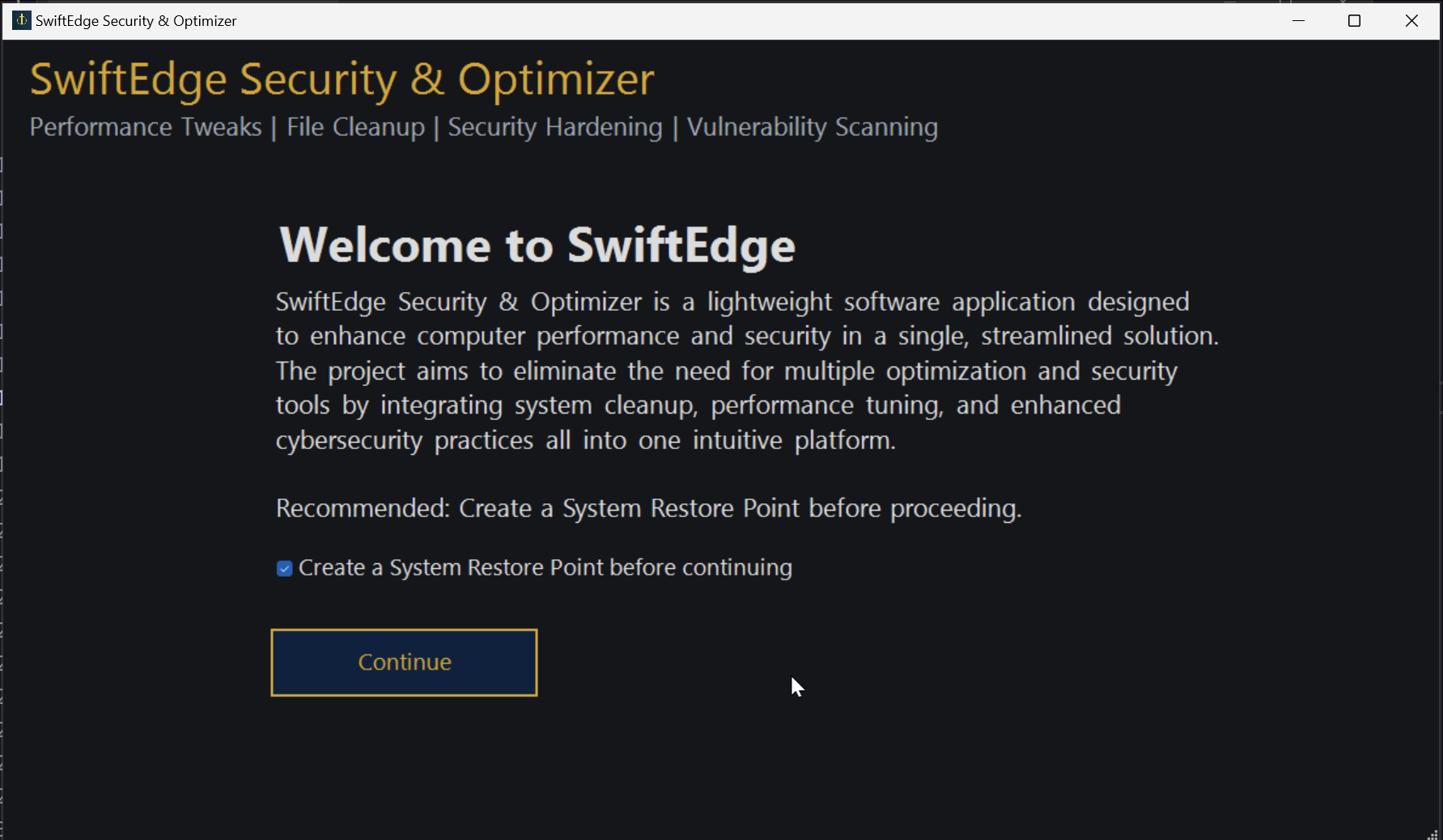 Fig. 1. The loading screen and restore point prompt.
The Performance module is intended to improve Windows responsiveness through a focused set of user-selectable actions. In the implemented code, this includes changing to Ultimate Performance or High Performance when available, disabling SysMain, Windows Search, and DiagTrack, reducing animations and transparency, disabling background apps and Windows tips, disabling hibernation, reducing startup delay, disabling current-user startup applications, and enabling Game Mode and hardware-accelerated GPU scheduling. A reset button was also added for this module so the performance changes can be returned to a baseline state.
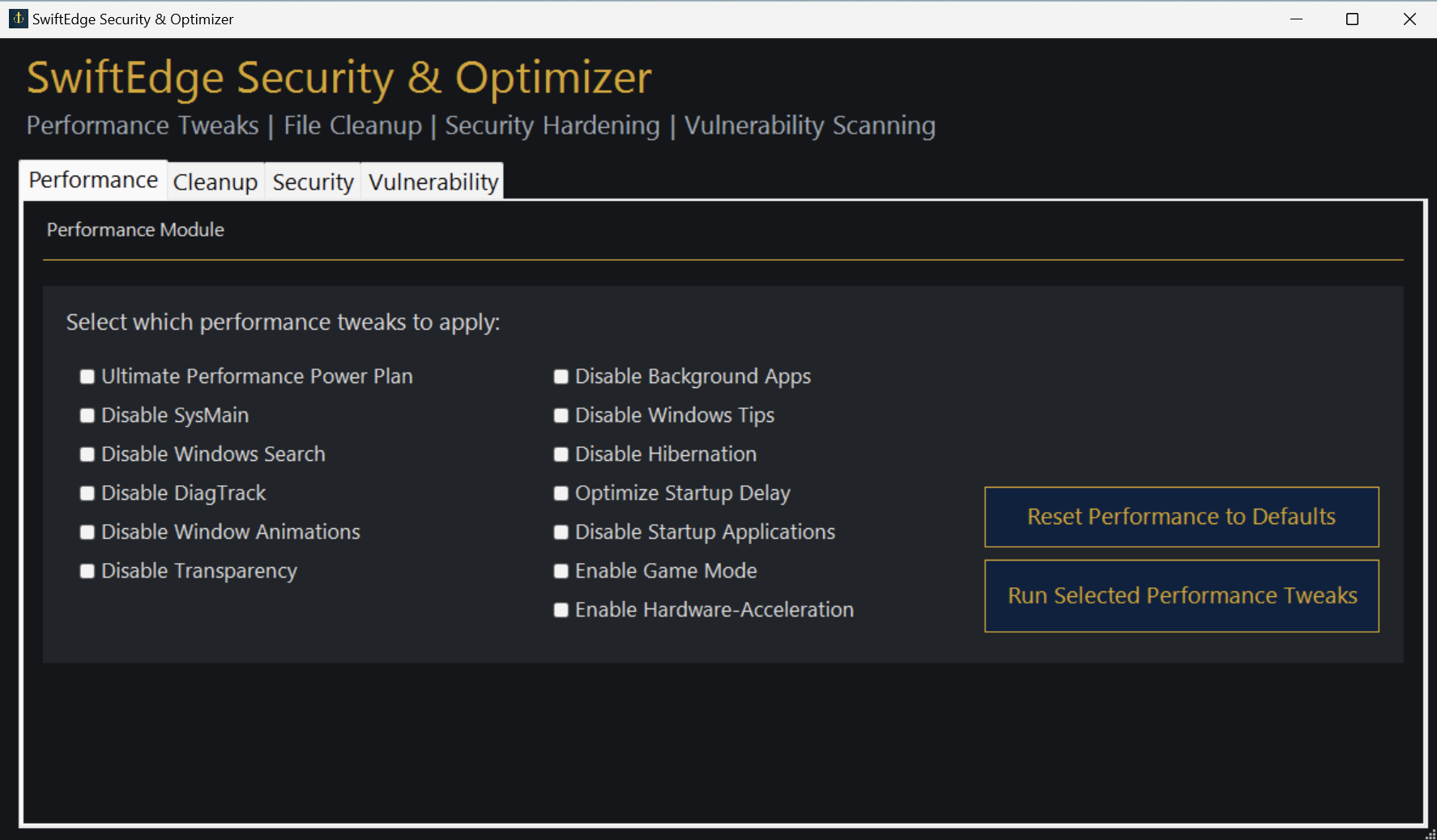 Fig. 2. Performance Module & Tweaks
The Cleanup module groups common maintenance actions into one location. The current implementation clears temporary files, clears the Windows Update cache, empties the recycle bin, removes selected built-in apps, clears event logs, runs Disk Cleanup, and performs additional cleanup of logs and dump-related files. This module relies on Windows-native commands and file-system operations so that the functionality remains lightweight and self-contained.
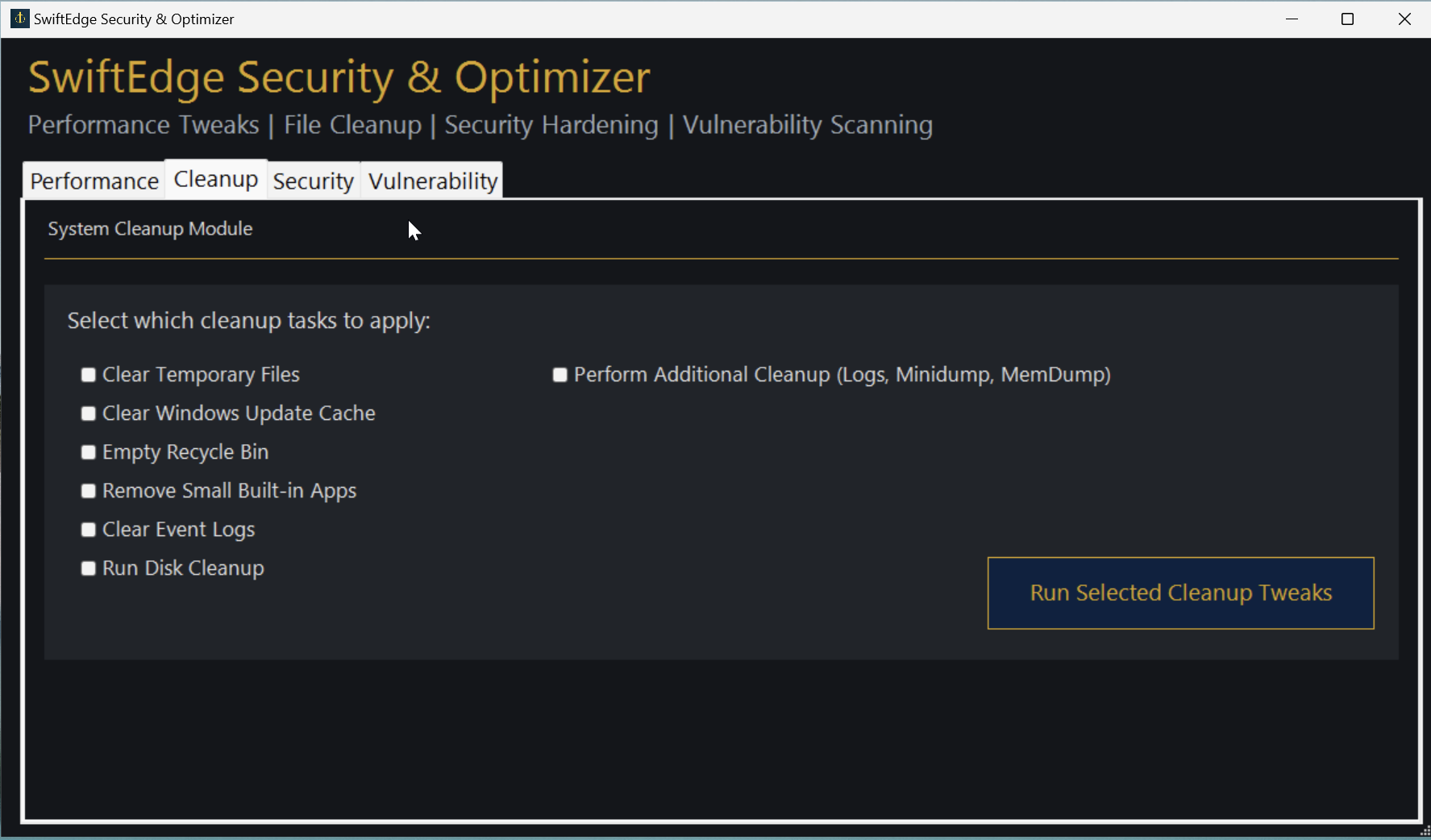 Fig. 3. The Cleanup module and maintenance options.
The Security module is responsible for applying lightweight hardening changes through built-in Windows capabilities. In the current implementation, it disables SMBv1, disables insecure SMB guest access, disables Remote Assistance, disables Remote Registry, enables Defender real-time monitoring, enables Defender behavior monitoring, enables Defender IOAV protection, enables Memory Integrity, and enables Windows Firewall for all profiles. A module-level reset button is also present to return these settings to a safe baseline rather than restoring intentionally insecure behavior.
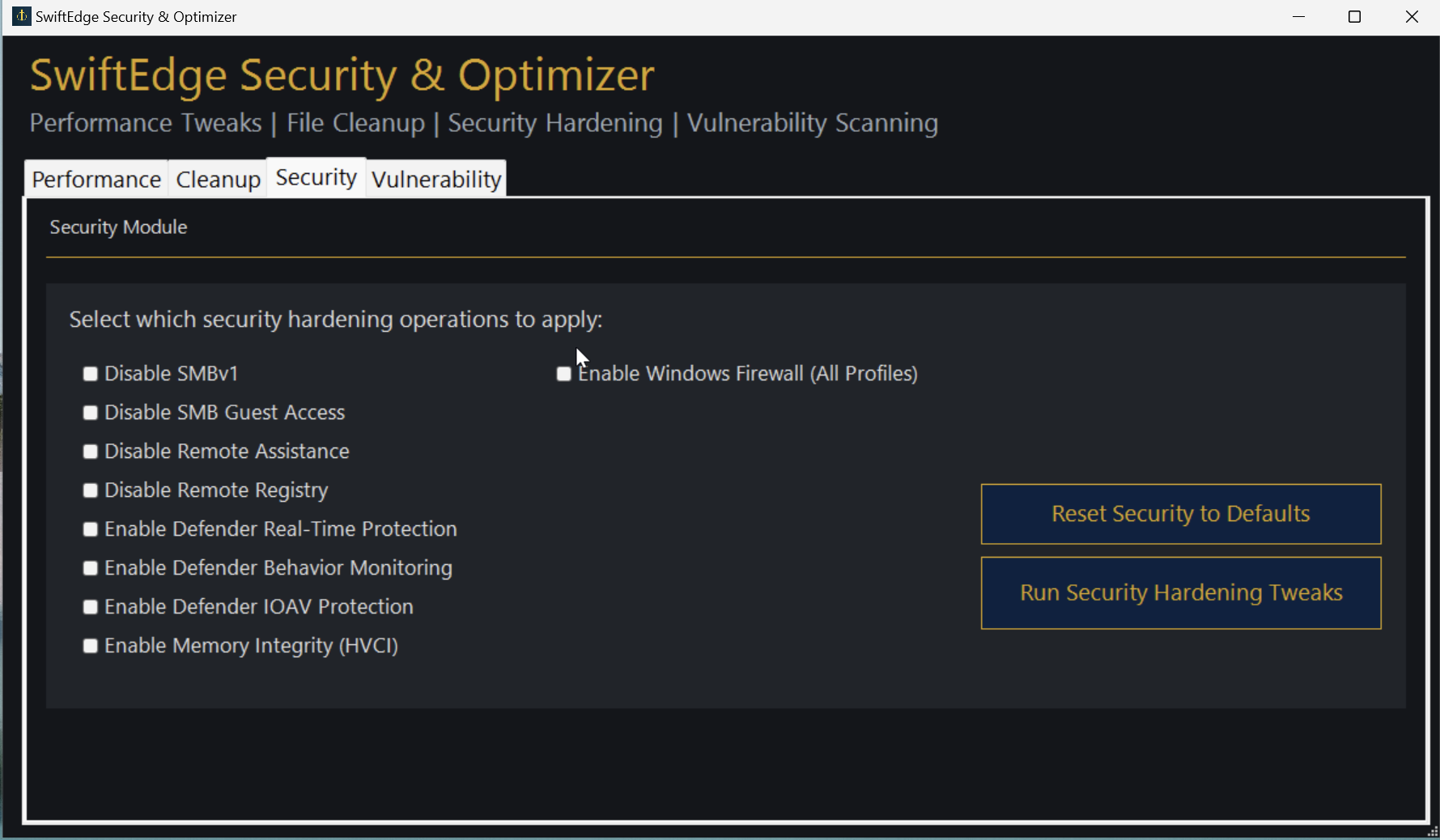 Fig. 4. The Security module and hardening options.
The Vulnerability Scanner module is implemented differently from the other modules because it requires external data retrieval and parsing. The scanner downloads the current yearly NVD JSON feed when needed, stores a local cache, parses the data, retrieves installed software names and versions from registry uninstall locations, compares those versions against NVD configuration and version-range information, and then displays a ranked summary of vulnerable applications in the GUI output area. This feed-based approach was used to avoid repeatedly depending on direct live queries and to make repeated scans more practical during development and testing.
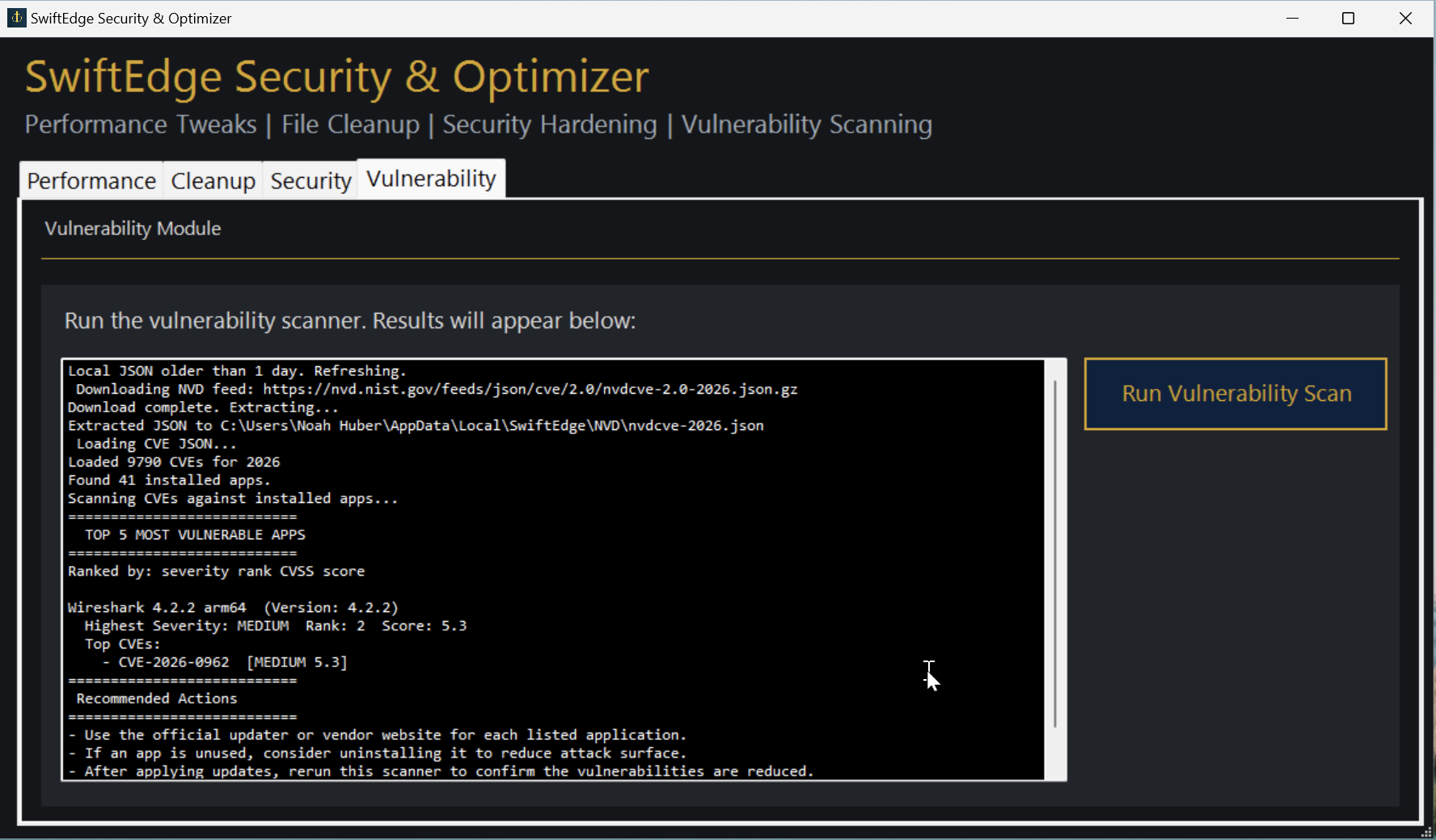 Fig. 5. The Vulnerability Scanner output panel.
Below is the link to our project repository: NoahCHuber/CSCISeniorProject
6. Test Plan
Testing for the project is documented in a dedicated test-plan file. The maintained approach is developer-driven and focuses on functional verification of individual modules, regression testing after fixes, and integration testing across the shared GUI. The current test-plan scope centers on actions that can be observed, logged, or verified through registry values, service states, GUI behavior, and vulnerability output.
The current testing categories include:
- Unit testing of module behaviors
- Regression testing after fixes or feature additions
- Integration testing across the GUI and module interactions
The maintained test-plan document is:
7. Test Results
Testing to date has primarily been manual and developer-performed. Evidence has been captured through GUI behavior, module completion prompts, logs, and verification of registry or service changes where applicable. The codebase and accompanying project notes show that testing was revised over time, especially as module behavior and documentation were changed to better reflect measurable outcomes and the current implementation.
7.1 Manual Testing Results Overview Table
Here is a small section overviewing the testing results in a table.
| Test Area | Initial State | Test Steps | Expected Outcome | Actual Outcome |
|---|---|---|---|---|
| GUI Launch and Navigation | Application not running | Launch the script or executable, continue through the welcome screen, and select each tab | GUI opens correctly, restore-point prompt appears, and all four tabs are visible and usable | The application launched into the welcome screen, showed the restore-point prompt, and exposed all four tabs after continuing. |
| Performance Module | Default system state before performance changes | Select performance options and run the module from the Performance tab | Selected performance actions apply and produce completion feedback and logs | The performance module applied the selected actions and returned completion and log output through the GUI. |
| Security Module | Security settings at pre-test state | Select security hardening options and run the Security tab | Security settings update successfully with confirmation feedback and logs | The security module applied the selected hardening options and returned confirmation and log output. |
| Cleanup Module | Temporary files, update cache, and cleanup targets present | Run selected cleanup options from the Cleanup tab | Cleanup routines remove target data and provide completion feedback | The cleanup module completed the selected tasks and produced completion and log output. |
| Vulnerability Scanner | Scanner not yet run and NVD data not yet loaded for the current session | Open the Vulnerability tab and run the scanner | Installed software is evaluated, NVD data is retrieved or reused from cache, and results appear in the output panel | The scanner retrieved or reused NVD feed data, checked installed software, and displayed ranked results in the GUI output panel. |
| Build and Packaging | Source powershell scripts in modular structure | Run the build script to generate combined script or executable output | Build process generates a combined script or standalone executable for app | The build workflow generated the combined script and executable output for use in testing and demonstration. |
7.2 Interpretation of Results
The manual testing results show that the project is functioning as an integrated Windows utility rather than as a disconnected set of scripts. The GUI, module execution flow, logging, and vulnerability-scanning workflow are all present and usable in the current implementation. The strongest results are in the consistency of the module layout and the ability to execute actions through the interface with clear completion messaging and log generation.
The results also reinforce the main tradeoff in the current project state: local performance, cleanup tasks, and security settings complete more directly because they rely on built-in Windows commands, while vulnerability scanning is inherently heavier because it depends on feed retrieval, caching, parsing, and version comparison. Even so, the scanner is functioning in a way that is suitable for demonstration and manual verification.
Overall, the current findings support the conclusion that SwiftEdge meets the core implementation goals of the project: a modular GUI, working performance/security/cleanup actions, a functioning vulnerability scanner, and an executable-oriented build workflow. The remaining gaps are more closely related to refinement, reporting depth, and future expansion than to missing core functionality.
The current testing baseline, results, and related notes are documented in:
8. Challenges Overcome
One of the most significant challenges was the vulnerability scanner. Early approaches to retrieving vulnerability information were constrained by API query limitations. The project moved to a feed/cache based model using the yearly NVD JSON feed, which made scanning more feasible while still introducing the new challenge of parsing and comparing a large vulnerability dataset in PowerShell.
Another major challenge was learning PowerShell deeply enough to implement a full Windows Forms interface rather than just a collection scripts. The project required combining scripting, GUI layout, event handling, logging, and modular organization in a way that remained maintainable and presentable. Including long-term elasticity.
Packaging the project as a single executable was also a major development challenge. The application was originally created in a modular fashion including multiple scripts. These scripts were called through the main, however PS2EXE does not compile multiple scripts normally. This required creating a single PowerShell build script which combined all of the separate scripts first before passing the argument to PS2EXE to create a executable. Initial attemps were caught by PS2EXE using compiled scripts as an add-on instead of an embedded file. Compiling as a single script first solved the issue. Under most circumstances, the executable can run even with scripts policy disabled.
9. Future Enhancements
The current project provides a functional foundation, but several future enhancements remain realistic and valuable:
- Get a signed digital certificate for SwiftEdge so it does not flag Windows smartscreen/defender.
- Improve vulnerability matching performance and accuracy
- Add richer export/reporting options for vulnerability results
- Expand rollback and change-tracking support across modules
- Add more advanced security settings for power users
- Introduce STIG-based or profile-based hardening options
- Expand measurable test-result reporting tied directly to specific registry values, services, and timings
- Improve executable distribution readiness & release packaging
10. Defense Presentation Slides
The Defense Presentation Slides should be a mirror of this document which outlines the immense depth of the project and aligns with defense requirements.
The Defense Presentation Slides are located:
11. Additional Considerations
The application does not take, store, or process sensitive data. All interactions are local and in memory only. SwiftEdge is not responsible for damages, issues, or corrupt machines.
11.1 Internet & Network Dependencies:**
SwiftEdge Security & Optimizer requires network access to pull CVE database from NIST, otherwise the application functions offline.
11.2 Performance Issues & Optimization:**
As the year progresses, more CVES are added to the annual JSON, which can lead to longer load times for vulnerabilities on the system.
11.3 Scalability: Can the Application Handle Growth?**
The application is meant for personal/private use and is not backed with long term support. Additional features may be implemented in the future. The application is not for enterprise use.